HR Operations Suite
SAP SuccessFactorsReinvent Mass Data Updates in SAP SuccessFactors
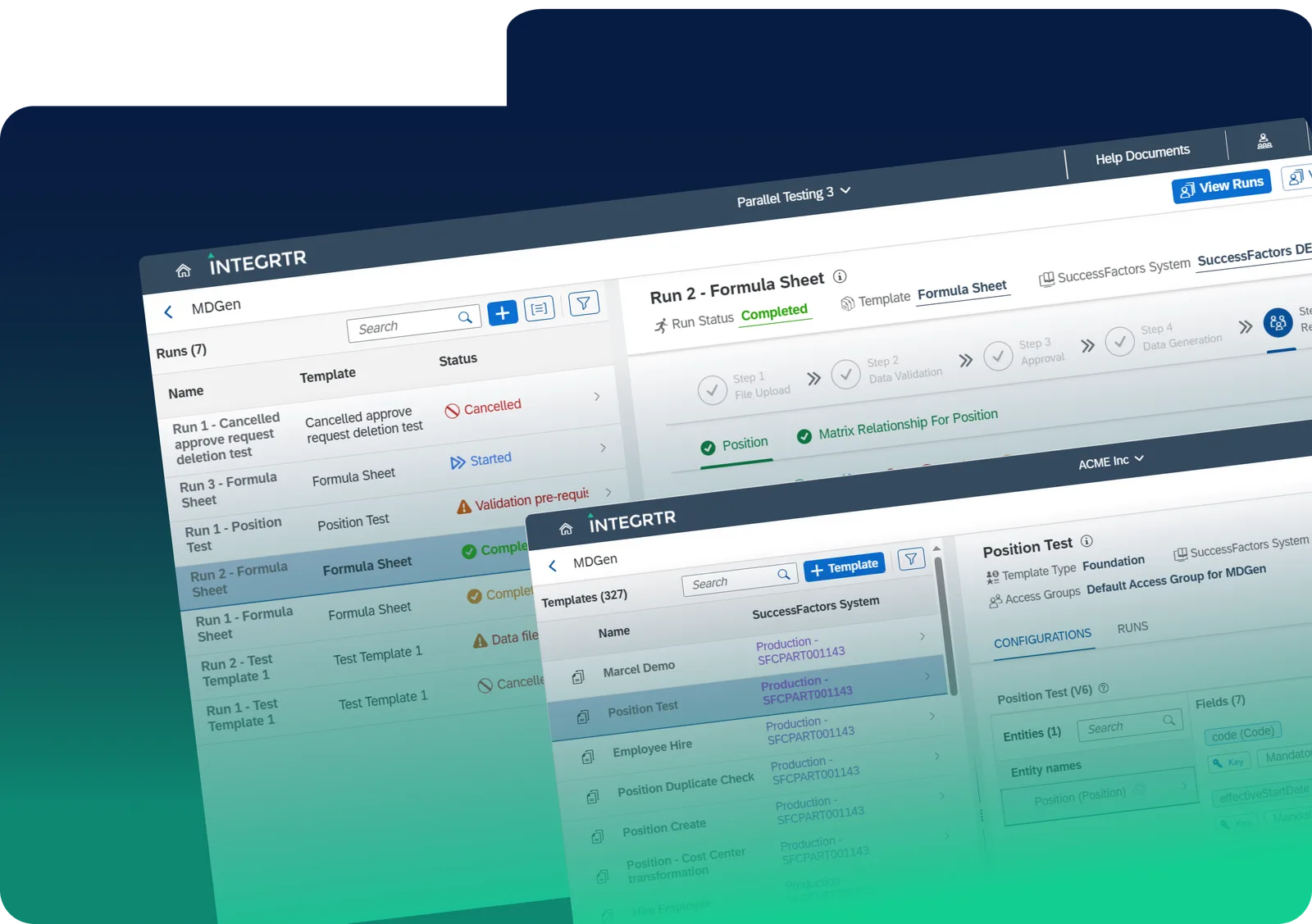
Automate recurring and ongoing mass data changes in SAP SuccessFactors: updating employee records, managing salary and benefits, restructuring departments, handling mergers, or fixing data errors. With built-in validations, streamlined workflows, and user-friendly controls, MDGen ensures accuracy and efficiency, so you can focus on people, not processes.
Customer proof
Real World Impact
as reported by one of our customers from Southeastern Europe
"MDGen has been a game-changer for our HR data migration process. We used it for IT1, IT2, and UAT across Southeastern European (SEE) countries, and now it's our go-to for Production migration. The ability to quickly generate templates for data collection has streamlined our workflow. It also simplifies communication, ensuring everyone understands data formats and field requirements. What used to be a tedious process of explaining IDs and labels is now much more efficient. By automating template creation and improving data accuracy, MDGen has reduced manual effort and accelerated migrations making HR system transitions smoother than ever!"
- Jonas Zichtl-Popko, Head of Employee Core Solutions @ UNIQAWhy MDGen
Why MDGen?
Modern HR teams often need to perform mass data changes in SAP SuccessFactors, such as onboarding seasonal workers, updating benefits, or reorganizing entire departments. Relying on traditional methods, like Excel templates or CSV uploads, can lead to data inconsistencies, compliance risks and ineffective workflows. That's where the INTEGRTR Mass Data Generator (MDGen) steps in to revolutionize how you handle mass data changes.
The challenge
Challenges you face as an HR
being an HR...
HR teams frequently grapple with large-scale, repetitive bulk data updates, from salary adjustments to transferring employees across geographies. Relying on manual processes creates:
As organizations grow, these mass data changes multiply, demanding a solution that scales with your SAP SuccessFactors environment.
- Inconsistencies in Data
Human error and outdated information slow down operations.
- Risk of Overwriting
Uncoordinated mass updates may overwrite existing records or cause duplication.
- Resource Drains
Manual validations eat up valuable HR and IT bandwidth.
- Compliance Gaps
Tracking updates for audits or governance becomes cumbersome.
The solution
Tailored for HR needs
INTEGRTR Mass Data Generator (MDGen) is specifically built to simplify mass data changes in SAP SuccessFactors. Whether you're onboarding new hires, processing terminations, or revamping an entire structure after a merger, MDGen provides:
Guided Workflows
for large-scale HR updates
- Effortless Mass Change
- Streamlined HR Process
- Empowered HR Teams
Pre-Built Custom Templates
to fit your unique business scenario
- Personalized Experience
- Increased Productivity
- Standardized Templates

End-to-End Governance
with automated checks and role based permissions
- Regulatory Compliance
- Data Security & GDPR
- Higher Data Quality
Real Time Insights
to track progress & identify errors instantly
- Optimized User Experience
- Comprehensive Monitoring
- Scalable & Future Ready

How it works
MDGen guides mass data changes in SAP SuccessFactors through five stages
“Actions like bulk hiring, reorganizations, or laying off seasonal employees become straightforward and fully auditable within SAP SuccessFactors.”

Define Templates & Rules
- Prebuilt Templates: Jumpstart any mass data change with out-of-the-box templates designed for common use cases (like bulk hiring or mass terminations).
- Customizable Workflow: Easily tailor fields and mapping rules via a low-code/no-code approach, so you can adapt MDGen to specific business needs, roles, or compliance requirements.
Why it matters
By standardizing your mass changes up front, you minimize risks of human error and ensure consistent data handling across multiple SAP SuccessFactors tenants or modules.
“AI-powered checks ensure data accuracy, compliance, and permissions, while draft review processes prevent accidental errors or duplication.”
Intelligent Data Checks
- Built-In Governance: Every record undergoes AI-driven and rule-based checks for accuracy, consistency, and compliance with role-based permissions (RBP).
- Draft Review & Duplication: Draft, review, and approve changes before they go live, eliminating accidental overwrites or duplications.
Why it matters
Maintaining data integrity is critical for SAP SuccessFactors. MDGen ensures that updates meet your organization's HR and legal standards, safeguarding sensitive information from errors or unauthorized access.
“Easily execute bulk updates like new hires or terminations with a few clicks, leveraging real-time data for informed HR and IT decisions.”

Guided Mass Data Loads
- Streamlined Execution: Run bulk updates (like new hires, department realignments, or seasonal terminations) with just a few clicks.
- Data Driven Decision Making: Leverage centralized, real-time data for better HR and IT strategies.
Why it matters
Traditional manual updates via Excel or CSV are prone to inconsistencies and missed steps. MDGen orchestrates large-scale tasks so HR and IT teams can act confidently and reduce cycle times significantly.
“Gain full visibility with live dashboards to track updates and generate audit trails, ensuring transparency and accountability in data changes.”

End to End Visibility
- Live Dashboard: Track progress across departments or geographic regions, letting you see where updates succeed or fail instantly.
- Generate Audit Trails: Generate comprehensive reports for internal stakeholders or external audits, showing exactly which changes were made, when, and by whom.
Why it matters
This centralized view of your mass data changes keeps teams informed and accountable. It also streamlines compliance efforts (e.g., GDPR) by logging every update to SAP SuccessFactors in detail.
“Enhance efficiency with reusable templates for future tasks and seamless data replication across tenants, ideal for mergers and global rollouts.”

Continuous Improvement
- Reusable Templates: Save successful configurations for future bulk tasks, facilitating best practices and knowledge sharing.
- Cross Tenant Data Replication: Seamlessly migrate or replicate data across multiple SAP SuccessFactors HCM tenants, perfect for mergers, acquisitions, or global rollouts.
Why it matters
As your organization grows, so do the demands on your HR systems. MDGen scales effortlessly, letting you handle mass changes of any magnitude without bottlenecks or added complexity.
New in MDGen
Introducing Hybrid Run
Streamlining HR Data Across SuccessFactors and SAP ECC
We're introducing one of MDGen's most impactful upgrades yet: Hybrid Run. It is designed to seamlessly integrate your employee data across SAP SuccessFactors and SAP ECC in a single, efficient flow. Whether you're onboarding a new hire or ensuring updates are synchronized, Hybrid Run simplifies the process with built-in automation and validation, allowing you to focus on what truly matters.
Pre-Checks
Hire in SuccessFactors
Replication to SAP ECC
Infotype Enrichment
Hybrid Templates simplify configuring both SuccessFactors entities and SAP HCM infotypes within a single workflow. And with Landscape Management, you can easily map and organize your HR systems, bringing clarity and structure to complex integrations.
Customer voice
Transformational Results from Our Customers' Business
Join the INTEGRTR customers empowering their workforce with MDGen


With the implementation of SAP SuccessFactors Employee Central (including payroll data) as our global HR system, we laid the foundation for a unified cloud-based master data system with interfaces to our two payroll systems, SAP S/4HCM and Paychex. Thanks to INTEGRTR Assist & Monitor, we ensure seamless data replication in our hybrid landscape, automate processes and close existing process gaps, minimizing errors and reducing the workload for our HR department.

Flyer
Download the MDGen Flyer
Get the complete MDGen overview (capabilities, use cases, and technical details) delivered straight to your inbox.
Load the form to continue
We keep this form off the page until you are ready, so nothing loads by default. Loading it lets HubSpot set the cookies it needs to receive your details.
No cookies are set until you choose to load it.
Disclaimer: SAP, SAP BTP, SuccessFactors, Employee Central and SAP Integration Suite are registered trademarks of SAP SE.
Frequently asked questions
How do I execute bulk data updates in SAP SuccessFactors?
Performing bulk data updates manually via spreadsheets in SAP SuccessFactors is slow and prone to errors. Using a dedicated tool like the INTEGRTR Mass Data Generator (MDGen), HRIT teams can automate bulk updates such as organizational restructures, legal entity changes, and employee movements- up to 90% faster with built-in system validation.
How can I prevent errors during SAP SuccessFactors bulk updates?
To eliminate data import errors, you need system-aware validation before execution. MDGen connects directly to your SAP SuccessFactors environment to validate data against your specific business rules, picklists, and Role-Based Permissions (RBP). This ensures 100% configuration accuracy before any data is written to the live system.
What is the fastest way to handle org restructures in SuccessFactors?
Large-scale organizational restructures require updating thousands of employee records and reporting lines simultaneously. INTEGRTR.MDGen replaces manual data wrangling with role-based templates and automated workflows, allowing HR operations teams to execute complex org changes and legal entity updates in minutes instead of weeks.
What is the ROI of automating HR mass changes?
Automating bulk HR updates with INTEGRTR.MDGen eliminates spreadsheet management, reduces process cycle times by up to 90%, and frees up highly paid HRIS resources for strategic work. By validating data prior to upload, it also prevents downstream payroll errors and keeps hybrid HR ecosystems perfectly in sync.
Which tool is best for managing bulk HR data updates in SAP SuccessFactors?
Tools like INTEGRTR.Mass Data Generator (MDGen) are designed specifically for managing bulk HR data updates, offering automation, validation, and governance capabilities that significantly reduce manual effort and errors.
Can SAP SuccessFactors data be updated across multiple systems or tenants?
Yes, MDGen supports cross-tenant data replication and integration with systems like SAP ECC, enabling consistent data updates across hybrid HR landscapes and global deployments.
Looking to upgrade your enterprise integration?
Talk to our SAP SuccessFactors, S/4HANA and Workday integration experts about your landscape.