HR Productivity Suite
SAP SuccessFactorsProactive Monitoring for Flawless SAP SuccessFactors Integrations.
Monitor Every Integration, Every Time.
Integrations connect your systems, but is your SuccessFactors Integration Monitoring efficient? INTEGRTR Monitor CLDM ensures seamless monitoring of all your SAP SuccessFactors integrations, offering deep visibility, GDPR-compliant logging, proactive alerts, and actionable insights, all from one central dashboard.
The challenge
The Reality of Hybrid HR Operations

SAP SuccessFactors doesn't operate in isolation, it connects with multiple systems across your organization, from payroll to finance, identity management to benefits. Ensuring data flows correctly between these systems is critical to smooth HR and IT operations.
But monitoring these integrations is easier said than done. IT teams struggle with:
- Lack of Centralized Visibility
Errors go unnoticed until they impact operations.
- Time-Consuming Troubleshooting
Identifying issues usually takes longer than fixing them.
- Compliance Concerns
Managing mass hires, promotions, and changes raises GDPR and audit questions.
Without a dedicated monitoring solution, integration failures result in payroll errors, onboarding delays, and compliance risks, costing your business time, money, and trust.
The solution
Centralize tracking, alert proactively, and act on process health
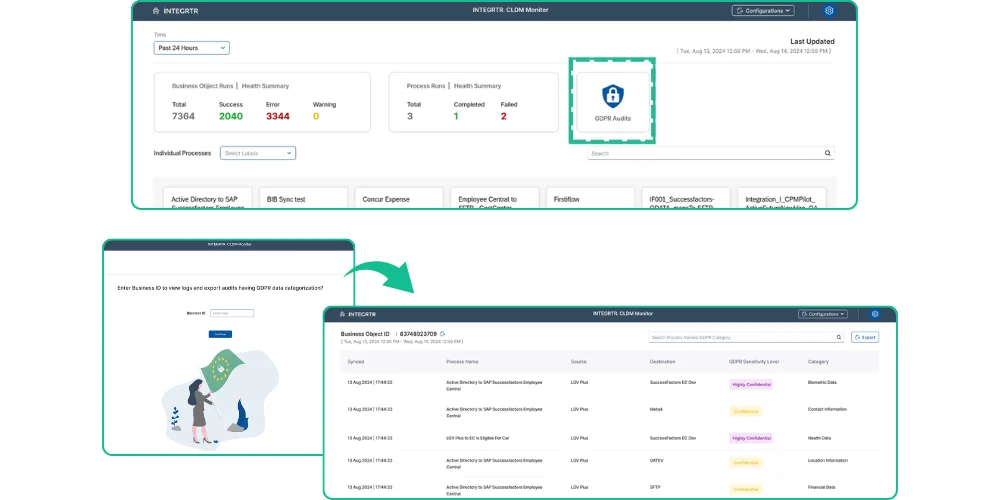
INTEGRTR Monitor CLDM transforms SuccessFactors Integration Monitoring. It centralizes integration tracking, proactively alerts you to potential failures, and provides deep insights into process health and data quality.
- 1
Track every integration from one screen
All flows across SAP SuccessFactors and SAP Integration Suite land on a single dashboard, with no middleware-by-middleware checking. - 2
Failures announce themselves
Proactive alerts reach you via MS Teams, email, or your preferred channel before an unnoticed error becomes a payroll problem. - 3
Root causes surface fast
Structured logs point straight to the failed process and the exact business object affected, so troubleshooting starts at the answer. - 4
Compliance is built into the log
Sensitive data movements stay visible and auditable, keeping GDPR questions answerable at any time.
How it works
From Integration Run to Auditable Record
How INTEGRTR Monitor CLDM turns raw integration runs into proactive alerts and audit-ready records, stage by stage.
“All flows across SAP SuccessFactors and SAP Integration Suite report into a single dashboard.”
Every integration on one screen
- All SAP SuccessFactors and SAP Integration Suite flows tracked in one place.
- No middleware-by-middleware checking to see where data stands.
Why it matters
Logging into middleware platform after middleware platform hides errors until they hit operations. One monitor removes the blind spots.
“Proactive alerts reach you over MS Teams, email, or your preferred channel before an error becomes a payroll problem.”
Failures announce themselves
- Automated alerts for integration failures and anomalies.
- Notifications routed to MS Teams, email, or your channel of choice.
Why it matters
An unnoticed integration failure surfaces as a missed payroll or a delayed onboarding. Proactive alerts move the discovery earlier, when it is still cheap to fix.
“Structured logs point straight to the failed process and the exact business object affected.”
Root causes surface fast
- Categorized process errors and progress labels organize every run.
- Detailed error analysis pinpoints the exact business object that failed.
Why it matters
Identifying an issue usually takes longer than fixing it. Categorized, structured logs let troubleshooting start at the answer.
“Sensitive data movements stay visible and auditable, keeping GDPR questions answerable at any time.”
Compliance is built into the log
- Built-in GDPR reporting with detailed audit logs of sensitive data flows.
- Deploy within your SAP landscape or on the INTEGRTR-Platform.
Why it matters
Mass hires, promotions, and changes raise GDPR and audit questions. A built-in record of sensitive data flows keeps the answers ready.
Why choose it
Why Choose INTEGRTR Monitor CLDM?
Seamless integrations, zero blind spots
Compliance at Your Fingertips
Flexible Deployment Options
Designed for Business & IT Teams
Unparalleled Visibility
Faster Issue Resolution
Capabilities
Key Features of INTEGRTR Monitor CLDM
Deep visibility, compliant logging, and proactive alerts in one dashboard
Centralized Integration Monitoring
Advanced Reporting & Analytics
Error Categorizations & Progress Labels
Automated Alerts & Notifications
GDPR Reporting & Compliance
Multiple Deployment Options
Customer voice
Transformational Results from Our Customers' Business
Join the INTEGRTR customers empowering their workforce with Monitor CLDM


With the implementation of SAP SuccessFactors Employee Central (including payroll data) as our global HR system, we laid the foundation for a unified cloud-based master data system with interfaces to our two payroll systems, SAP S/4HCM and Paychex. Thanks to INTEGRTR Assist & Monitor, we ensure seamless data replication in our hybrid landscape, automate processes and close existing process gaps, minimizing errors and reducing the workload for our HR department.

Flyer
Download the Monitor CLDM Flyer
Get the complete INTEGRTR Monitor CLDM overview - capabilities, deployment options, and technical detail - delivered straight to your inbox.
Load the form to continue
We keep this form off the page until you are ready, so nothing loads by default. Loading it lets HubSpot set the cookies it needs to receive your details.
No cookies are set until you choose to load it.
Disclaimer: SAP, SAP BTP, SuccessFactors, Employee Central and SAP Integration Suite are registered trademarks of SAP SE.
Frequently asked questions
How can I monitor SAP SuccessFactors integrations in real time?
SAP SuccessFactors integrations can be monitored in real time using centralized monitoring tools that provide visibility across all integration flows. INTEGRTR Monitor CLDM offers a single dashboard to track integrations, detect failures instantly, and ensure continuous data flow across systems.
How do I set up alerts for SAP SuccessFactors integration failures?
Alerts can be configured through monitoring solutions that notify teams via channels like email or collaboration tools. Monitor CLDM provides automated alerts for failures and anomalies, ensuring teams can act immediately before issues escalate.
How can HR IT teams reduce troubleshooting time for SAP integrations?
HR IT teams can drastically reduce troubleshooting time by moving from reactive log checking to proactive monitoring. Tools like INTEGRTR Monitor CLDM offer structured logs, categorized process errors, and detailed error analysis that instantly pinpoints the exact business object that failed, accelerating issue resolution.
How do you ensure GDPR compliance in SAP SuccessFactors integrations?
Ensuring GDPR compliance requires auditing exactly how and where sensitive HR data flows between systems. INTEGRTR Monitor CLDM includes built-in GDPR reporting and detailed audit logs, giving organizations complete transparency and auditable proof of sensitive data movements across their hybrid landscape.
Can I monitor all SAP Cloud Integrations in one single dashboard?
Yes. Instead of logging into multiple different middleware platforms or system monitors, INTEGRTR Monitor CLDM acts as a single, centralized monitor. It tracks all integrations across your SAP SuccessFactors and SAP Integration Suite environments, eliminating blind spots for both Business and IT teams.
What are the business risks of poor SAP SuccessFactors integration monitoring?
Without a dedicated, proactive monitoring solution, integration failures often go unnoticed until they cause severe business disruptions. This leads to missing payroll data, employee onboarding delays, and critical compliance breaches. Automated alerts via MS Teams or email help prevent these issues before operations are impacted.
Where is INTEGRTR Monitor CLDM hosted and deployed?
INTEGRTR Monitor CLDM offers highly flexible deployment options to meet your enterprise security and architecture requirements. Organizations can choose to host the monitoring solution securely within their own SAP landscape or deploy it directly on the fully managed INTEGRTR-Platform.
Explore further
Related products and services
Looking to upgrade your enterprise integration?
Talk to our SAP SuccessFactors, S/4HANA and Workday integration experts about your landscape.