




While working on SAP UI5 applications in enterprise projects, I realised something. A lot of my time wasn’t spent building new features. It was spent going through existing code, understanding the structure, and figuring out how things work before touching anything.
We spend hours searching for where a specific fragment is used, tracing navigation routes across multiple controllers, debugging a binding that looks perfectly fine but refuses to render, or trying to understand legacy code written by someone who left the company three years ago.
I started using AI assistants to help speed things up, but I quickly hit a wall: the responses were generic. The AI was great at explaining UI5 framework concepts, but it couldn’t help me fix my app because it had no visibility into my actual project files.
That’s when I discovered MCP (Model Context Protocol).
By integrating a filesystem-based MCP server into my workflow, my AI assistant’s responses evolved from, “Here’s a generic UI5 example” to “Here is exactly what is happening in your controller, fragment, and model.”
Here is a quick walkthrough of how I set it up and how it’s actively solving real-world UI5 headaches for me.
What is MCP (In Simple Terms)?
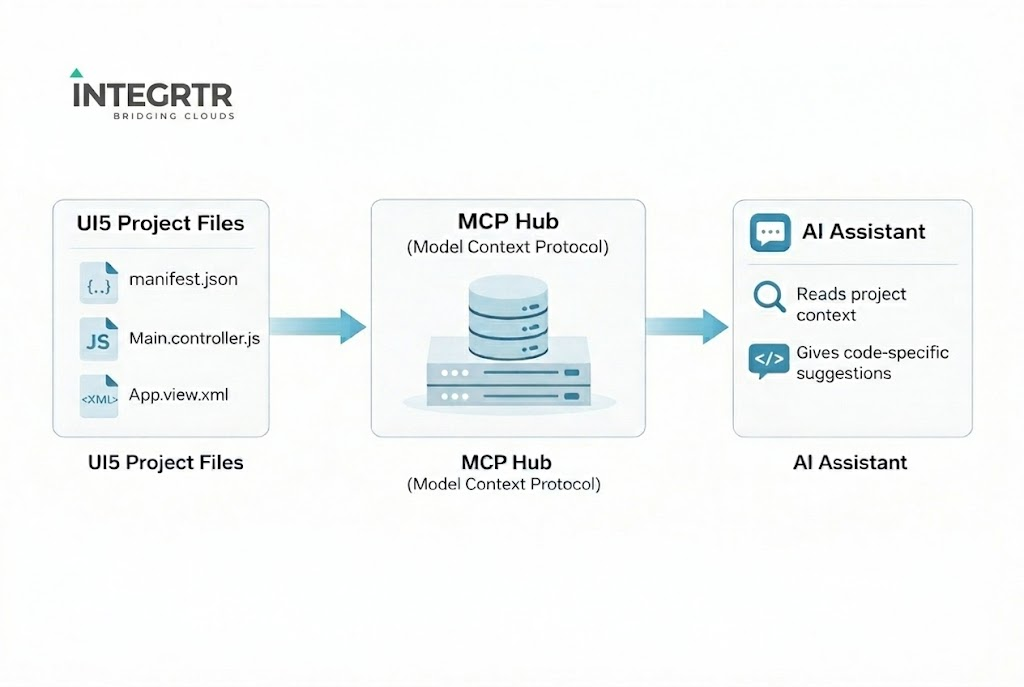
MCP is a standard that allows your AI assistant to securely access your local project context. Instead of guessing how your app is structured, the AI can actually read your UI5 project files, understand your folder hierarchy, and analyze your specific controllers, views, and fragments.
Think of the workflow like this: Your UI5 Project → MCP Server → AI Assistant
The AI formulates answers based on your actual code. For massive, sprawling UI5 applications, this context-awareness is an absolute game-changer.
Setting Up MCP for a UI5 Project
I kept my setup straightforward by using the standard filesystem MCP server. Here is how you can get it running in minutes using an MCP-compatible editor like Cursor or VS Code.
Step 1: Install the MCP filesystem server globally
npm install -g @modelcontextprotocol/server-filesystem
Step 2: Configure your editor
Add the following configuration to your MCP setup file:
{
  "mcpServers": {
    "ui5-project": {
      "command": "npx",
      "args": [
        "@modelcontextprotocol/server-filesystem",
        "/path/to/your/ui5-project"
      ]
    }
  }
}
Save the file and restart your editor. That’s it! Your AI is now “plugged in” to your UI5 project.
Where MCP Helps Me the Most (Real UI5 Use Cases)
Once the AI could actually “see” my code, the way I tackled daily tasks completely shifted. Here are five areas where it made an immediate impact:
1. Understanding Controller-View Flow
When diving into an unfamiliar module, I used to manually trace the logic. Now, I simply ask: “Explain the flow of this controller and its related view.”
Because the AI can read the controller and identify the linked XML view, it effortlessly traces event handlers, explains the lifecycle methods, and maps out the navigation.
2. Finding Fragment Usage
Tracking down reusable UI5 components used to mean running global searches and sifting through dozens of false matches.
Now, I ask: “Where exactly is this fragment used?” With MCP, the AI provides exact usage references, points out the specific calling controllers or views, and offers suggestions for better reusability.
3. Debugging Stubborn Binding Issues
We’ve all been here:
<Text text="{employeeModel>/name}" />
The XML looks correct, but the screen is blank. Instead of tearing my hair out, I tell the AI: “Check this XML view and controller for binding issues.”
The AI can cross-reference the files and instantly point out if the model wasn’t set at the correct level, or if I used the wrong model name in the setModel() function.
4. Navigation & Routing Analysis
In projects with complex routing, I often found myself searching for navTo calls just to understand which route opens a view or where the navigation starts. MCP changed that by giving a clear picture of the entire flow across the manifest.json and controllers within seconds.
5. Writing Accurate System Documentation
When working on help documentation for complex features, like SF data reporting or export applications, understanding the underlying code takes a significant amount of effort.
With MCP, I can quickly get a clear summary of how different modules interact and how data flows through the application, which helps me keep the documentation aligned with the actual system behavior.
My Day-to-Day Best Practices
If you are going to try this, here is what has worked best for me:
- Be hyper-specific with prompts: Don’t just say “Fix this.” Instead, ask, “Check this controller for UI5 best practice issues,” or “Find unused fragments in this module.”
- Limit your scope: Point the MCP server only to the relevant project folder. Giving it a narrower scope improves both performance and response quality.
- Use it for comprehension, not just generation: MCP is brilliant for code understanding, dependency tracing, refactoring suggestions, and onboarding into legacy projects. Let it be your guide, not just your code-writer.
Final Thoughts
AI becomes truly useful when it understands your project, not just the framework you are using.
Integrating MCP into my workflow made AI vastly more practical for enterprise UI5 development. It feels less like I’m querying a generic chatbot and more like I have a project-aware senior developer sitting next to me.
If you work on large, legacy, or complex SAP UI5 applications and are already experimenting with AI tools, I highly recommend setting up MCP. It takes five minutes, but the daily productivity gains are massive.