HR Productivity Suite
SAP SuccessFactorsUnified Integration Monitoring for SAP SuccessFactors
Seamless Integration Monitoring for SAP SuccessFactors (SF) and SAP HCM/ERP
Take control of your HR data replication and integrations with a centralized, intelligent monitoring solution. Gain real-time visibility into data replication and reduce errors across your hybrid SAP landscape, including SAP SuccessFactors, SAP HCM, SAP ERP, and SAP ECC integrations.
The challenge
The Hidden Integration Gaps Hurting Your HR Data Flow, Until Now

Managing integration health between SAP SuccessFactors, SAP HCM, SAP S4HANA, and third-party systems can be complex. Without a unified way to monitor SuccessFactors integration, organizations face visibility gaps, error overload, and compliance risks.
But monitoring these integrations is easier said than done. Organizations face challenges such as:
- Lack of Visibility
Standard SAP monitoring is fragmented across multiple applications, such as ECC, S4HANA, and CPI, making it difficult to track issues efficiently.
- Error Overload
Integration errors accumulate in large volumes, with no effective way to classify, filter, or prioritize them.
- Delayed Resolutions
Troubleshooting issues often requires navigating multiple systems, including Core Hybrid and Side-by-Side architectures, delaying corrective action.
- Disruptions to HR Operations
Replication failures can directly impact payroll, employee records (PA), and organizational data (OM), causing delays across the entire process.
- Compliance & Data Quality Issues
Inconsistent data across systems leads to regulatory risks and inaccurate employee information across hybrid architectures.
Without real-time integration insights, HR and IT teams are left reacting to failures instead of preventing them, leading to system downtime, inconsistent data, and operational bottlenecks.
The solution
The Smart, Centralized, Automated Way to Monitor SuccessFactors Integration
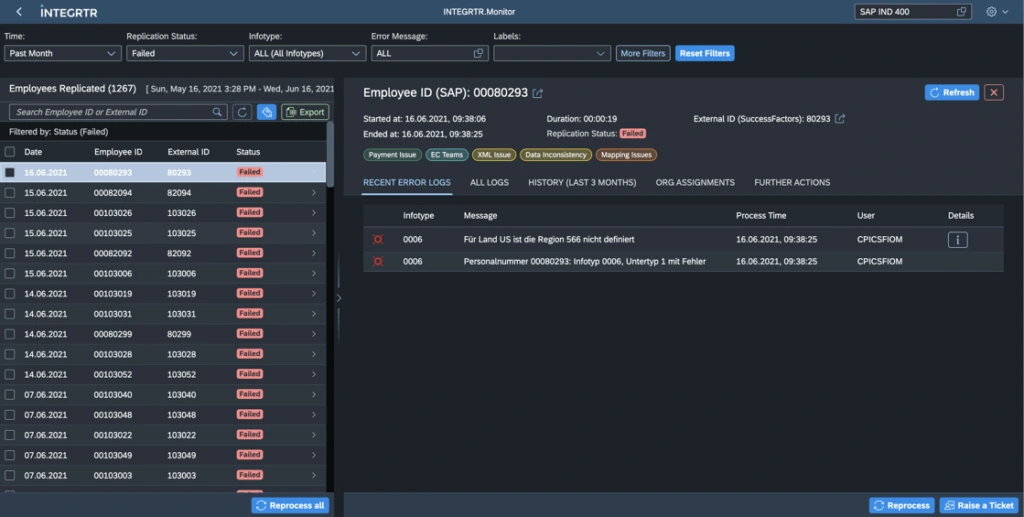
INTEGRTR.Monitor transforms how you monitor SuccessFactors integration for SAP SuccessFactors and SAP HCM/ERP by offering a unified, automated, and intelligent approach to error detection and resolution. Where the standard SAP Data Replication Monitoring stops at basic tracking, INTEGRTR gives HRIT one place to monitor SuccessFactors integration across every hybrid flow.
- 1
See every replication in one place
Employee Central to ERP, ERP to EC, S/4HANA, and CPI flows land on a single dashboard instead of being scattered across SAP transactions and middleware monitors. - 2
Errors arrive pre-sorted
Logs are grouped into clusters by Infotype, error code, and custom tags, so triage starts the moment something fails, not after an SLG1 archaeology session. - 3
The right people hear about it first
Critical replication failures reach your team over Microsoft Teams, Slack, or Email before they reach payroll. - 4
Fix it without waiting for the next run
Reprocess affected employees selectively, attach your own resolution notes, and hand issues to Jira or Asana without leaving the Monitor UI.
How it works
From Replication Failure to Resolved Issue
How INTEGRTR.Monitor turns a replication failure into a resolved issue, stage by stage.
“EC to ERP, ERP to EC, S/4HANA, and CPI flows all report into a single dashboard.”
Every replication in one view
- Employee Central to ERP, ERP to EC, S/4HANA, and CPI flows land on one screen.
- Historical logs show integration trends and replication performance over time.
Why it matters
When replication status is scattered across SAP transactions and middleware monitors, blind spots hide until payroll breaks. One dashboard removes them.
“Failures are grouped into clusters by Infotype, error code, and custom tags the moment they happen.”
Errors arrive pre-sorted
- Automated error classification across Infotypes, employee records (PA), and org (OM) structures.
- Filter by Infotype, error code, and custom category to pinpoint the failing entity.
Why it matters
Digging through standard SLG1 logs is where hours disappear. Pre-sorted clusters mean triage starts at the answer, not the search.
“Critical replication failures reach your team over Microsoft Teams, Slack, or Email before they reach payroll.”
The right people hear about it first
- Real-time alerts and reports over Microsoft Teams, Slack, and Email.
- Issues hand off to Jira or Asana for tracked resolution.
Why it matters
A failure nobody sees becomes a payroll problem. Real-time alerts put the right people on it before that happens.
“Reprocess affected employees selectively, add resolution notes, and close the issue inside the Monitor UI.”
Fix it without waiting for the next run
- Selective reprocessing of employee records outside the standard schedule.
- Custom business rules auto-handle recurring replication failures.
Why it matters
Waiting for the next scheduled run stretches a small fix into a long delay. Selective reprocessing closes the loop on your schedule, not the batch's.
Why choose it
Why Choose INTEGRTR Monitor?
Seamless integrations, zero blind spots
Increase Efficiency
Ensure Data Quality
Simplify Collaboration
Automate Notifications & Processing
Holistic Monitoring
Capabilities
Key Features of INTEGRTR Monitor
Everything you need to keep hybrid HR data flowing
Efficient Monitoring
- Centralized dashboard for SuccessFactors Employee Central (EC), SAP HXM/HCM/ERP, and third-party integrations across ECC, S4HANA, and CPI.
- Historical log analysis with insights on integration trends, data replication performance, and hybrid system issues.
Advanced Error Handling
- Automated error classification and grouping across error clusters, Infotypes, employee records (PA), and org (OM) structures.
- Detailed filtering by Infotypes, error codes, and custom categories, ensuring easy identification of issues within EC to ERP, EC to S4HANA, and other SAP architectures.
- Contextual navigation to affected entities for quick resolution and root cause analysis.
Automated Notifications & Collaboration
- Alerts and reports sent via Microsoft Teams, Slack, and Email, for effective communication on critical replication issues.
- Seamless integration with ticketing platforms like Jira and Asana, enabling automatic issue assignment and tracking from within the INTEGRTR.Monitor UI.
- Assign, track, and resolve integration issues easily, helping teams act swiftly on critical HR data flow issues.
Selective Reprocessing & Data Control
- Ability to reprocess employee records outside standard schedules, offering flexibility for timely updates and critical changes.
- Data replication monitoring (DRM) for core hybrid, side-by-side, and SLG1 architectures, ensuring smooth data synchronization.
- Custom business rules for automated handling of replication failures and system-specific issues.
ROI
Estimate Your Monitoring ROI
Curious what centralized monitoring is worth for your landscape? Size the hours your team can save every month in a few clicks.
Customer voice
Transformational Results from Our Customers' Business
Join the INTEGRTR customers empowering their workforce with our HR Monitor


With the implementation of SAP SuccessFactors Employee Central (including payroll data) as our global HR system, we laid the foundation for a unified cloud-based master data system with interfaces to our two payroll systems, SAP S/4HCM and Paychex. Thanks to INTEGRTR Assist & Monitor, we ensure seamless data replication in our hybrid landscape, automate processes and close existing process gaps, minimizing errors and reducing the workload for our HR department.

Flyer
Download the Monitor Flyer
Get the complete INTEGRTR.Monitor overview - capabilities, integration coverage, and technical detail - delivered straight to your inbox.
Load the form to continue
We keep this form off the page until you are ready, so nothing loads by default. Loading it lets HubSpot set the cookies it needs to receive your details.
No cookies are set until you choose to load it.
Disclaimer: SAP, SAP BTP, SuccessFactors, Employee Central and SAP Integration Suite are registered trademarks of SAP SE.
Frequently asked questions
How do I efficiently monitor SAP SuccessFactors to SAP HCM integrations?
Standard SAP monitoring is often fragmented across SAP ECC, S/4HANA, and CPI, making troubleshooting difficult. The most efficient approach is using a centralized dashboard like INTEGRTR.Monitor to track all Employee Central (EC) to ERP, and ERP to EC data replications in real-time, eliminating visibility gaps.
How can IT teams manage SAP integration error overload and SLG1 logs?
Digging through standard SAP SLG1 logs is highly time-consuming. INTEGRTR.Monitor solves this by automatically aggregating and filtering error logs into clusters by Infotypes, error codes, and custom tags. This allows HR and IT teams to easily triage and resolve data replication issues without navigating multiple systems.
How does INTEGRTR improve upon the standard SAP Data Replication Monitor (DRM)?
While the standard SAP DRM provides basic tracking, INTEGRTR.Monitor enhances your integration health by offering automated error classification, contextual navigation for root-cause analysis, and built-in help documentation. It also connects directly to third-party ticketing tools like Jira and Asana for a seamless resolution workflow.
Can I get Microsoft Teams or Slack alerts for SAP SuccessFactors errors?
Yes. INTEGRTR.Monitor automates your integration notifications by sending real-time alerts for critical replication failures directly to Microsoft Teams, Slack, or Email. This ensures your HRIT team is always in the loop and can react to system downtime immediately.
Looking to upgrade your enterprise integration?
Talk to our SAP SuccessFactors, S/4HANA and Workday integration experts about your landscape.