

HR Productivity Suite
SAP SuccessFactorsYour HR Event Bridge for SuccessFactors
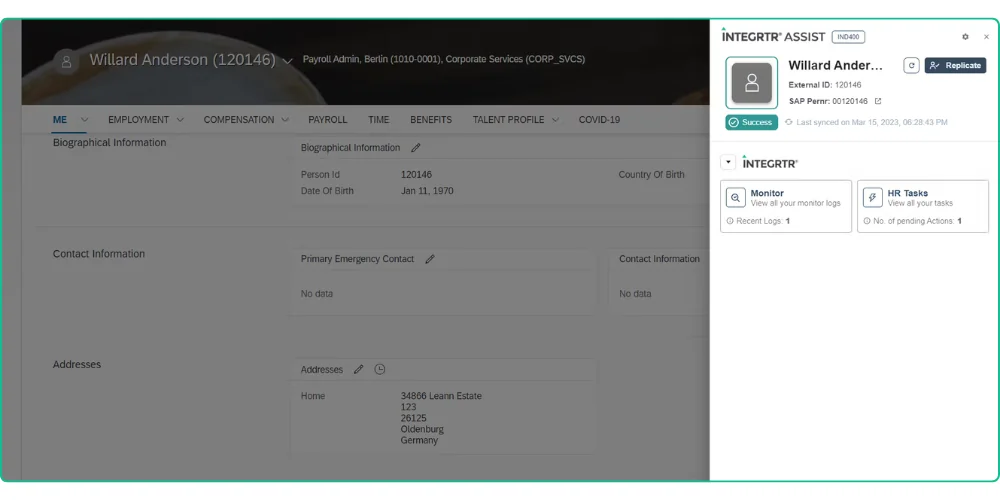
Seamless HR process execution across your hybrid SAP SuccessFactors landscape. Empower HR teams with hybrid HR process automation to work smarter, not harder. INTEGRTR.Assist ensures smooth cross-system task execution, eliminating data silos and manual lookups.
The challenge
Disconnected Systems, Disrupted Workflows

Navigating hybrid HR processes shouldn't feel like a maze. Yet, without seamless connectivity, executing key HR tasks across systems becomes a time-consuming, error-prone challenge. Organizations face challenges such as:
- Data Silos
Employee information is spread across SAP SuccessFactors, SAP HCM, ServiceNow, and other systems.
- Manual Lookups
Switching between applications wastes valuable time.
- Limited Process Visibility
Lack of real-time insights leads to inefficiencies.
- User Frustrations
Navigating complex integrations without context disrupts workflows.
- Security Concerns
Ensuring the right access to the right people while maintaining compliance.
Without a centralized knowledge hub, HR and IT teams struggle with inconsistent processes, repetitive queries, and slow issue resolution, leading to operational inefficiencies and employee frustration.
The solution
The Smart Way to Execute Hybrid HR Processes
INTEGRTR.Assist enhances HR operations by bringing critical data and actions into your SAP SuccessFactors UI.
- 1
Context where you already work
Relevant employee data from SAP HCM and connected systems appears directly on the SuccessFactors screen you have open. - 2
The next step finds you
Guided workflows point to the next logical action in any process, so nobody has to memorize transaction paths. - 3
Third-party tasks, one click away
ServiceNow tickets, SAP HCM actions, and other tools open in context instead of in another tab hunt. - 4
Less searching, more doing
The time saved on lookups goes back into actually executing HR work.
How it works
From Open Profile to Completed Action
How INTEGRTR.Assist turns a SuccessFactors screen into a cross-system command center, stage by stage.
“Relevant employee data from SAP HCM and connected systems appears right inside the SuccessFactors UI.”
Context on the screen you already have open
- SAP HCM and connected-system data render directly on the SuccessFactors profile.
- Personnel numbers, pending tasks, documents, and time data load without a system switch.
Why it matters
Data spread across SuccessFactors, SAP HCM, and ServiceNow forces manual lookups. Bringing the context to the open screen removes the searching.
“Guided workflows point to the next logical action, so nobody has to memorize transaction paths.”
The next step finds you
- Guided workflows surface the next action in any cross-system process.
- No transaction codes or navigation paths to remember.
Why it matters
Complex cross-system processes stall when people have to recall where each step lives. A guided next action keeps the work moving.
“ServiceNow tickets, SAP HCM actions, and other tools open in context instead of in another browser tab.”
Third-party tasks, one click away
- Execute SAP HCM, ECC, S/4HANA, and ServiceNow actions from inside SuccessFactors.
- Extend to any third-party tool with an available API.
Why it matters
Every tab switch is lost time and lost context. Executing third-party tasks in place keeps the HR professional in one place.
“Assist runs in your browser context and honors your existing SuccessFactors role-based permissions.”
Inside your permissions, inside your browser
- No sensitive HR data flows outside your system.
- Existing SAP SuccessFactors role-based permissions are honored throughout.
Why it matters
Convenience cannot come at the cost of compliance. Working within the browser and honoring RBP means no data leaves the system and no one sees more than they should.
Why you'll love it
The Efficiency Boost Your HR Team Needs
Eliminate process roadblocks, cut manual effort, and leverage hybrid HR process automation to execute hybrid HR tasks effortlessly right from SAP SuccessFactors.
Eliminate Manual Lookups
Accelerate HR Processes
Improve User Experience
Ensure Data Integrity
Seamless Adoption
Capabilities
Key Features of INTEGRTR.Assist
Blended Hybrid Experience
- Perform essential SAP HR tasks directly within the SuccessFactors UX.
- No need to manually navigate between multiple systems.
Real-Time Data Access
- Instantly retrieve personnel numbers, access employee records, and update HR data.
- View pending tasks, documents, or time data without delays.
Extensible Integrations
- Supports integrations with SAP HCM, ECC, S/4HANA, ServiceNow, and more.
- Easily extend functionality to any third-party tool with available APIs.
Security & Compliance
- Works within your browser context: no HR data flows outside the system.
- Honors existing SAP SuccessFactors role-based permissions.
Customer voice
Transformational Results from Our Customer Businesses
Join the INTEGRTR customers empowering their workforce with INTEGRTR.Assist


With the implementation of SAP SuccessFactors Employee Central (including payroll data) as our global HR system, we laid the foundation for a unified cloud-based master data system with interfaces to our two payroll systems, SAP S/4HCM and Paychex. Thanks to INTEGRTR Assist & Monitor, we ensure seamless data replication in our hybrid landscape, automate processes and close existing process gaps, minimizing errors and reducing the workload for our HR department.

Flyer
Download the Assist Flyer
Get the complete INTEGRTR.Assist overview - capabilities, use cases, and technical detail - delivered straight to your inbox.
Load the form to continue
We keep this form off the page until you are ready, so nothing loads by default. Loading it lets HubSpot set the cookies it needs to receive your details.
No cookies are set until you choose to load it.
Disclaimer: SAP, SAP BTP, SuccessFactors, Employee Central and SAP Integration Suite are registered trademarks of SAP SE.
Frequently asked questions
How can I simplify HR processes across SAP SuccessFactors and other systems?
HR processes across SAP SuccessFactors, SAP HCM, and third-party tools can be simplified by bringing data and actions into a single interface. INTEGRTR.Assist enables users to execute tasks directly within SuccessFactors without switching between systems.
How can I reduce manual lookups in SAP SuccessFactors workflows?
Manual lookups can be reduced by using tools that provide contextual data within the workflow. INTEGRTR.Assist surfaces relevant employee and process information directly in the UI, eliminating the need to search across systems.
Can I integrate ServiceNow tasks directly into SAP SuccessFactors?
Yes. Managing employee tickets usually requires leaving the HR system. INTEGRTR.Assist provides seamless system connectivity, allowing HR professionals to view, manage, and execute third-party tasks from ServiceNow or Jira directly within their existing SAP SuccessFactors environment.
Is it secure to access SAP HCM data from the SuccessFactors UI?
Absolutely. INTEGRTR.Assist operates securely within your browser context, meaning no sensitive HR data flows outside of your system. Furthermore, it strictly honors your existing SAP SuccessFactors Role-Based Permissions (RBP), ensuring users only see the data they are authorized to access.
How do I quickly find an employee's SAP Personnel Number in SuccessFactors?
Without an integration bridge, finding cross-system IDs requires manual lookups. INTEGRTR.Assist provides real-time data access right on the employee profile. It instantly retrieves SAP Personnel Numbers, pending tasks, and time data without any system delays or manual searches.
Looking to upgrade your enterprise integration?
Talk to our SAP SuccessFactors, S/4HANA and Workday integration experts about your landscape.