
How to Overcome SAP SuccessFactors Monitoring Challenges in 2025?
28 January 2025 · By Nitish Mehta
Picture a busy Monday morning: HR needs to finalize payroll, but a sudden error in one of your SAP SuccessFactors integrations puts everything on…


integration
Parth Dhingra · 23 July 2026
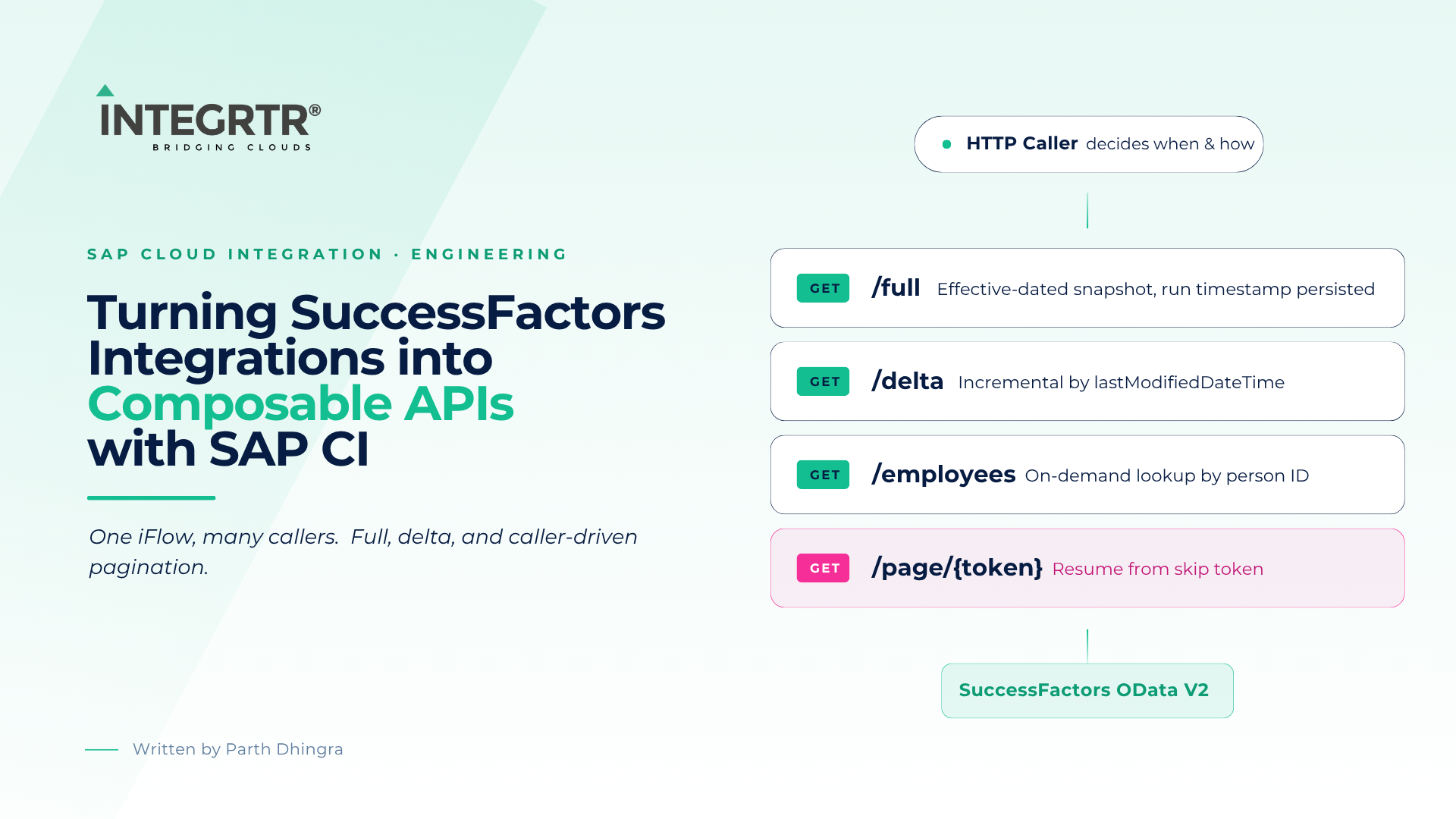
Most Integrations on SAP Cloud Integration that replicate HR master data are built as scheduled batch jobs - a timer fires, a fixed OData query runs, and results are pushed downstream. This iFlow takes a fundamentally different approach: it is exposed as a Composable API. An external caller decides when it runs, what mode it uses, and how many records it fetches per page. The integration platform acts less like a cron job and more like a RESTful service backed by SuccessFactors.
Core premise: By binding the execution model to an inbound HTTP call, the same integration can serve scheduled orchestrators, on-demand provisioning workflows, and paginated bulk exports - without duplicating logic across multiple integration artefacts.
The HTTP Sender Adapter is configured with a wildcard path:
This allows the integration flow to accept and process multiple endpoint variations dynamically, with the Groovy script handling the routing and query construction logic internally as below.
The path-based routing happens in groovy script - It inspects CamelHttpPath and CamelHttpQuery, constructs the correct OData query string, sets it as property sfQuery, and marks the updateLSRD flag to control whether the Last Run Date Time should be persisted after a successful run.
The script starts by reading the routing inputs and defining the base $select/$expand projection. This projection is path-independent - only filters and effective dating change per path.
    def headers = message.getHeaders()
    def properties = message.getProperties()
    def path = headers.get("CamelHttpPath")
    def queryParams = headers.get("CamelHttpQuery")
    def lastRunDateTime = properties.get("LastRunDateTime")
    def updateLSRD = "false"
    def customQuery = ""
    def sfQuery = """\$select=personIdExternal,personId,employmentNav/personIdExternal,employmentNav/jobInfoNav/company,employmentNav/jobInfoNav/companyNav/name,employmentNav/jobInfoNav/countryOfCompanyNav/externalCode,employmentNav/jobInfoNav/countryOfCompanyNav/localeLabel,employmentNav/jobInfoNav/department,employmentNav/jobInfoNav/departmentNav/name,employmentNav/jobInfoNav/employeeClassNav/externalCode,employmentNav/jobInfoNav/employeeClassNav/localeLabel,employmentNav/jobInfoNav/employmentTypeNav/externalCode,employmentNav/jobInfoNav/employmentTypeNav/localeLabel,employmentNav/jobInfoNav/costCenter,employmentNav/jobInfoNav/emplStatusNav/externalCode,employmentNav/jobInfoNav/emplStatusNav/localeLabel&\$expand=employmentNav,employmentNav/jobInfoNav,employmentNav/jobInfoNav/companyNav,employmentNav/jobInfoNav/countryOfCompanyNav,employmentNav/jobInfoNav/departmentNav,employmentNav/jobInfoNav/employeeClassNav,employmentNav/jobInfoNav/employmentTypeNav,employmentNav/jobInfoNav/emplStatusNav"""
    def pageSize = "200" // default
$pagesize is an optional parameter. If the caller supplies it, use it; otherwise fall back to the default.
if (queryParams && queryParams.toLowerCase().contains("\$pagesize=")) {
        try {
            pageSize = queryParams.split("(?i)\\\$pagesize=")[1].split("&")[0]
        } catch (Exception e) {
            pageSize = "200"
        }
    }

 customQuery = "customPageSize=" + pageSize
Appends &asOfDate=9999-12-31 to the OData query, making SuccessFactors return records effective up to the far future in the tenant. The date value is hardcoded in script and can be adjusted to narrow or shift the effective-date window (e.g. today's date for active-only, or a near-future date for pre-hire visibility). Sets updateLSRD=true so the run timestamp is persisted after completion.
 if (path?.toUpperCase()?.contains("FULL")) {
        updateLSRD = "true"
        sfQuery = sfQuery + "&asOfDate=9999-12-31"
    }
The /delta endpoint is designed to efficiently fetch incremental (delta) changes across multiple entities by applying a unified timestamp filter on lastModifiedDateTime.
else if (path?.toUpperCase()?.contains("DELTA")) {
        if (queryParams) {
            queryParams = queryParams.replaceAll("%20", " ").replaceAll("%27", "'")

            // Separate $pagesize from other params
            def extraParams = []
            queryParams.split("&").each { param ->
                if (!param.toLowerCase().startsWith("\$pagesize")) {
                    extraParams << param
                }
            }

            if (extraParams) {
                // Try to build delta filter from first extra param
                def filterParts = extraParams[0].split(" ")
                if (filterParts.size() >= 3) {
                    def qualifier = filterParts[1]
                    def queryDateTime = filterParts[2]
                    def deltaQuery = """&\$filter=lastModifiedDateTime $qualifier datetimeoffset$queryDateTime or employmentNav/lastModifiedDateTime $qualifier datetimeoffset$queryDateTime or employmentNav/jobInfoNav/lastModifiedDateTime $qualifier datetimeoffset$queryDateTime"""
                    sfQuery = sfQuery + deltaQuery
                } else {
                    // if not a filter, just append param(s) as-is
                    extraParams.each { p -> sfQuery = sfQuery + "&" + p }
                }
            } else {
                // Query had ONLY $pagesize → fallback to LastRunDateTime
                def query = """&\$filter=lastModifiedDateTime ge datetimeoffset'$lastRunDateTime' or employmentNav/lastModifiedDateTime ge datetimeoffset'$lastRunDateTime' or employmentNav/jobInfoNav/lastModifiedDateTime ge datetimeoffset'$lastRunDateTime'"""
                sfQuery = sfQuery + query
                updateLSRD = "true"
            }

        } else {
            // Truly no query params → use LastRunDateTime
            def query = """&\$filter=lastModifiedDateTime ge datetimeoffset'$lastRunDateTime' or employmentNav/lastModifiedDateTime ge datetimeoffset'$lastRunDateTime' or employmentNav/jobInfoNav/lastModifiedDateTime ge datetimeoffset'$lastRunDateTime'"""
            sfQuery = sfQuery + query
            updateLSRD = "true"
        }
    }
lastModifiedDateTime field.LastRunDateTime value - a timestamp persisted from the previous successful execution (stored whenever the updateLSRD flag is set to true). The caller doesn't need to supply this; the integration derives it automatically from its own run history. sample request: <baseUrl>/delta?$pagesize=100.Beyond full and delta, the same pattern extends to purpose-built endpoints. Here, /employees supports an on-demand lookup by external person ID - useful when a downstream system needs to re-sync a single record without waiting for the next scheduled run.
else if (path?.toUpperCase()?.contains("EMPLOYEES")) {
    updateLSRD = "false"

    if (queryParams) {
        // Decode encoded characters
        queryParams = queryParams.replaceAll("%20", " ")
                                 .replaceAll("%27", "'")
                                 .replaceAll("%22", '"')
                                 .replaceAll("%2C", ",")

        // Drop $pagesize, keep everything else
        def extraParams = queryParams.split("&").findAll {
            !it.toLowerCase().startsWith('$pagesize')
        }

        if (!extraParams.isEmpty()) {

            // Only ONE filter expression is allowed
            if (extraParams.size() > 1) {
                throw new IllegalArgumentException(
                    "Invalid request: only a single 'personIdExternal in (...)' filter is supported. Received: " + extraParams.join(" & "))
            }

            def param = extraParams[0].trim()


            param = param.replaceFirst(/(?i)^\$filter\s*=\s*/, "").trim()
            def pattern = ~/(?i)^personIdExternal\s+in\s*\(?\s*(['"][^'"]+['"])(\s*,\s*(['"][^'"]+['"]))*\s*\)?$/

            if (!(param ==~ pattern)) {
                throw new IllegalArgumentException(
                    "Invalid request: only queries of the form personIdExternal in \"2\",\"3\" are allowed. Received: " + param)
            }

            sfQuery = sfQuery + '&$filter=' + param
        }
    }
}
The final step publishes the results to the exchange properties so downstream integration flow steps can pick them up.
    message.setProperty("sfQuery", sfQuery) // SuccessFactors query and filter
    message.setProperty("updateLSRD", updateLSRD) // boolean flag to update last run
    message.setProperty("customQuery", customQuery) // page size
    return message
The iFlow connects to SuccessFactors using the SuccessFactors OData V2 adapter. A key aspect of this design is its dynamic query execution, driven entirely by message properties rather than hardcoded values.
PerPerson) and operation type (Query (GET)).sfQuery → Holds the dynamically constructed OData query string.customQuery → Contains additional query parameters such as $pagesize .SuccessFactors OData V2 uses $skiptoken-based server-side pagination. When a result set exceeds the requested page size, the response contains a __next link (surfaced in ci as the SkipToken_Fetch_Employee.SuccessFactors property). The iFlow implements a loop:
$pagesize from the inbound query string (default 200) and stores it as customQuery=customPageSize=N.SkipToken_Fetch_Employee.SuccessFactors property with the next-page URL.check token exclusive gateway evaluates whether a skip token is present. If yes, the flow routes to Processing type which checks if it should continue in "pagination" mode.SkipToken_Fetch_Employee.SuccessFactors value to a skiptoken header and Persists it in a Data Store for subsequent lookups. The nexturl_prefix parameter is prepended to build a caller-friendly continuation URL that routes back into this same iFlow at /page/{token}./page/{skipToken}, Groovy script extracts the token from the path and sets the skipToken header for a datastore lookup. The prepare query step reconstructs the SF request using this token, bypassing the full query-build logic.import com.sap.gateway.ip.core.customdev.util.Message
import java.net.URLDecoder
def Message processData(Message message) {
def headers = message.getHeaders()
def nextUrl = headers.get("next_url") ?: ""
// --- Extract query part only ---
def queryPart = nextUrl
if (queryPart.contains("?")) {
queryPart = queryPart.split("\\?", 2)[1]
}
// --- Extract $skiptoken
def skipToken = ""
def m = (queryPart =~ '(?i)(?:^|&)\\$skiptoken=[^&]+')
def matches = []
while (m.find()) {
matches << m.group()
}
if (!matches.isEmpty()) {
skipToken = matches.last()
if (skipToken.startsWith("&")) {
skipToken = skipToken.substring(1) // drop leading &
}
// Remove ALL $skiptoken occurrences from query
queryPart = queryPart.replaceAll('(?i)(?:^|&)\\$skiptoken=[^&]+', "")
// Clean up leftover connectors
queryPart = queryPart.replaceAll('&&+', "&")
queryPart = queryPart.replaceAll('^&', "")
queryPart = queryPart.replaceAll('&$', "")
}
// --- Decode remaining query (turn % encodings into actual chars) ---
def decodedQuery = URLDecoder.decode(queryPart, "UTF-8")
// Store results
message.setProperty("sfQuery", decodedQuery) // without skiptoken, decoded
if (skipToken) {
message.setProperty("customQuery", skipToken) // "$skiptoken=..." without leading "&"
}
return message
}
Architecture insight: Rather than fetching all pages internally in a single run, the iFlow returns one page at a time and provides the caller with a typed next-page URL. This shifts the pagination loop to the orchestrator, keeps individual iFlow executions short-lived, and gives the caller natural checkpointing.
After fetching raw employee data from SuccessFactors, the iFlow applies a multi-stage enrichment and transformation pipeline before the payload reaches the downstream target. The enrichment and transformation are done specific to the output format required from the API.
As part of this process, the MM_skiptoken mapping step extracts the skiptoken and transforms it into a consumer-friendly Next Page URL format. This URL is then embedded within the response payload, enabling end users to seamlessly fetch subsequent data sets.
The final response structure contains both:
Exposing the integration as a Composable API shifts real responsibility onto the caller - not just when data is consumed, but how reliably it's consumed. That flexibility isn't free:
nextUrl/skip token between calls to resume pagination correctly - if used incorrectly, the integration throws a runtime error rather than the pattern silently producing wrong results.This pattern is well suited to scenarios with multiple, varied consumers of the same HR dataset - but it isn't a universal replacement for scheduled batch integration. Simpler, single-consumer scenarios may be better served by a straightforward timer-based iFlow. The right choice depends on how many callers need this data, how they need to consume it, and how much operational overhead the team is willing to own.
Similar Posts
28 January 2025 · By Nitish Mehta
Picture a busy Monday morning: HR needs to finalize payroll, but a sudden error in one of your SAP SuccessFactors integrations puts everything on…
2 July 2024 · By Tanisha Gupta
On May 31st, 2024, I had an opportunity to attend SAP Stammtisch Plus in Gurgaon, an event that brought together industry professionals and experts…
25 January 2024 · By Srinath Talluri
Recently we have done a successful migration from the Neo to Cloud Foundry (CF) environment. In this blog, I will discuss our entire migration…
Talk to our SAP SuccessFactors, S/4HANA and Workday integration experts about your landscape.

